Long VR sessions only work when the headset stays comfortable. Even great hardware becomes tiring if the weight pulls forward, the straps pinch or heat builds up. In 2026, simple comfort mods (better straps, balanced battery packs and improved padding) make the biggest difference.
With a few upgrades, any headset can go from a 20-minute limit to relaxed, hour-long sessions.
TL;DR
- Redistributing weight and sealing light leaks delivers the biggest comfort gains for longer VR sessions.
- Airflow fixes fog and heat, while good hygiene habits keep pads and interfaces feeling fresh and extend gear life.
Why Comfort Beats Specs for Immersion
High resolution and powerful headsets mean nothing if the device becomes uncomfortable after a few minutes. True immersion relies on forgetting the headset is there, and that only happens when the weight, pressure and heat are managed well.
When a headset feels balanced and soft on the face, the brain can focus on the experience instead of the hardware. Comfortable gear keeps you relaxed, reduces motion fatigue and allows longer sessions without distraction. In the end, comfort does more for immersion than any spec sheet number, and helps you create the ideal setup.
Head Straps and Counterbalance Options
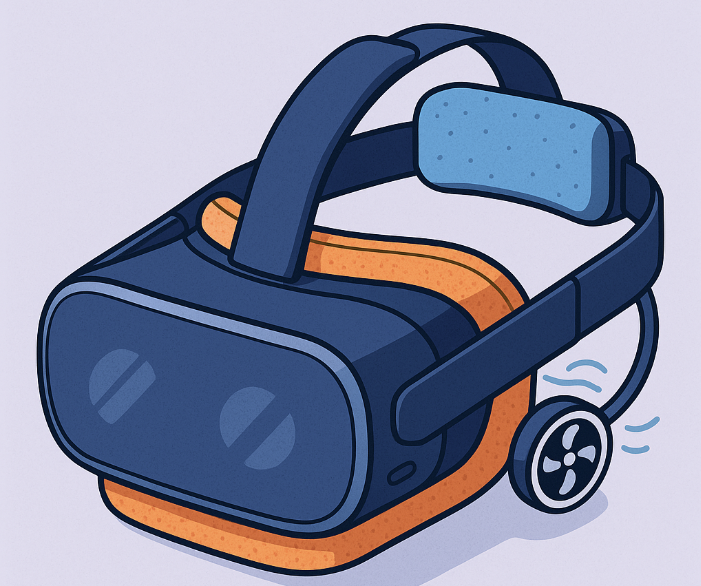
A good head strap is one of the fastest ways to improve long-session comfort. Factory straps on many VR headsets are designed for portability, not extended wear, which often leads to front-heavy pressure and forehead fatigue. Upgrading to a rigid or semi-rigid strap instantly redistributes weight across the top and back of the head, making the headset feel lighter even if it is not.
Counterbalancing takes this a step further. Adding a small rear weight or a battery pack at the back of the strap balances the headset’s front optics, reducing the feeling of forward pull. When the weight is evenly distributed, the headset sits naturally instead of needing continuous micro adjustments. This balance is what turns a headset from something you constantly notice into something that almost disappears during long sessions.
Face Interfaces: Pads, Light Leak and Hygiene
The face interface is where comfort either succeeds or fails. A soft, well-fitted pad can keep pressure even and prevent irritation, while a poor one makes the headset feel heavy within minutes. Upgrading the interface is one of the simplest ways to make long VR sessions easier on the skin and eyes.
Pads: softness and pressure distribution
Premium face pads use thicker foam or gel materials that distribute pressure across a wider area. This reduces hotspots on the cheeks and forehead and helps the headset stay stable without overtightening the strap. VR users who watch longer sessions often prefer removable pads so they can swap between soft-touch, breathable or cooler materials depending on comfort needs.
Light leak control: blocking the glow
Light leaking in from the nose gap or sides can break immersion, especially with passthrough technology, and cause eye strain over time. Modern replacement interfaces offer deeper sidewalls and improved contouring that block external light while still allowing ventilation. Proper light seal design also prevents the subtle glow that appears during bright scenes, which helps maintain focus during long viewing periods.
Hygiene: clean materials for clean sessions
Face pads absorb oil, sweat and heat, which means hygiene matters as much as comfort. Silicone interfaces and wipe-friendly foams make cleaning quick, especially for viewers who use VR frequently. Removable pads also allow rotation between sessions, keeping the headset fresher and extending the lifespan of the materials.
Airflow and Anti Fog Strategies
Good airflow is essential for staying comfortable in VR, especially during longer sessions where heat builds up behind the lenses. When warm air gets trapped, lenses fog and the headset starts to feel stuffy. Small airflow improvements can make a big difference.
Many users rely on vented face pads or thin air channels that let heat escape without creating light leaks. Others use lightweight external fans that clip onto the strap and quietly push warm air away from the lenses.
Anti fog solutions help too. A tiny bit of airflow across the lens surface often prevents fog completely, but additional options include anti fog wipes, hydrophobic coatings and lens inserts designed to stay clearer for longer.
Even simple steps like taking a short break or adjusting the fit to reduce the seal around the cheeks can help cool the interior. When airflow is managed well, the headset stays cooler, the image stays clear and long VR sessions become far more comfortable.
Weight, Heat and Pressure Points (Fit Guide)
Comfort in VR depends on three things working together: how the headset balances its weight, how well it releases heat and where the pressure sits on your face. When any of these feel off, long sessions become tiring fast. The good news is that small adjustments usually fix most problems.
Weight should feel centered rather than pulling forward. If the front optics drag downward, the top strap may need tightening or the back strap may need to sit lower on the head. Counterweights help too, but often the solution is simply finding the right angle so the headset “rests” instead of hanging.
Heat tends to build around the cheeks and forehead. Loosening the fit slightly, improving airflow or using a cooler foam pad can lower the temperature inside the interface. A fit that is too tight traps warm air and accelerates fogging, so small adjustments help keep things cool.
Pressure points appear when the headset presses harder on one area than another. This is usually due to uneven strap tension or pads that do not match the user’s face shape. Repositioning the pad, switching to a thicker cushion or adjusting the back strap angle usually spreads the pressure more evenly.
Common Pain to Mod to Expected Improvement
| Common Pain | Recommended Mod | Expected Improvement |
| Front-heavy pressure on the face | Rigid strap with rear counterweight or battery pack | Better balance, reduced cheek pressure, longer wearable time |
| Forehead or cheek hotspots | Thicker foam pad or gel face interface | More even pressure distribution and softer long-session comfort |
| Light leaking around the nose or sides | Deep-contour face interface or nose flaps | Stronger immersion and less eye strain during bright scenes |
| Lens fogging | Airflow vents, small strap fan or anti-fog wipes | Clearer image and fewer interruptions during long sessions |
| Heat buildup inside the headset | Cooler pad materials or slight fit loosening | Lower internal temperature and reduced sweat accumulation |
| Strap pinching or sliding | Top-strap adjustment or padded strap cover | More secure fit without tightness or head fatigue |
| Neck strain | Counterbalance weight or lighter face pad | Reduced forward pull and improved posture during extended use |
| Hygiene concerns | Removable, wipe-friendly silicone interface | Easier cleaning and longer material lifespan |
Quick Kits by Budget
Comfort mods do not need to be expensive. Many users see big improvements with small, affordable upgrades, while others prefer a full premium setup. These quick kits outline what to expect at each budget level and how much comfort they realistically add to long VR sessions.
Basic Kit: Affordable Essentials
A basic kit focuses on low cost fixes that solve the most common discomforts. A soft replacement face pad, a simple strap cover and an anti fog wipe can dramatically improve the feel of a stock headset.
These items reduce pressure, keep the lenses clear and help the headset sit more comfortably without major changes. For new users or anyone on a tight budget, the basic kit offers a surprising upgrade to day to day comfort.
Better Kit: Balanced and Noticeably More Comfortable
This level adds structural improvements. A rigid or semi rigid strap improves weight distribution, while a vented face interface enhances airflow and reduces heat buildup. Small counterweights can balance the headset more naturally, making long sessions far less tiring.
Users who watch longer VR content often find the better kit the ideal middle ground: not too expensive, but a clear jump in overall comfort and stability.
Best Kit: Maximum Comfort for Long Sessions
The best kit aims for extended, hour long comfort. It typically includes a premium rigid strap with an integrated battery, a high end face interface tailored to the user’s face shape and a quiet strap mounted cooling fan.
These upgrades keep weight balanced, airflow steady and heat under control. For users who spend serious time in VR, the best kit makes the headset feel significantly lighter and cooler, allowing the experience to take center stage instead of the hardware.
Cleaning and Storage Routines
Keeping a VR headset clean is essential for comfort and longevity. Sweat, oils and heat build up during longer sessions, and without regular upkeep the face pad and lenses start to feel unpleasant. A simple routine after each use helps the headset stay fresh.
Wiping the face interface with a gentle alcohol free cleaner and drying it fully prevents irritation the next time you put it on. Lenses benefit from microfiber cloths and dedicated lens spray to avoid streaking or scratches.
Storage matters too. Leaving a headset exposed to sunlight can damage optics, while storing it in a humid or dusty space shortens the life of straps and pads. A cool, dry shelf or case keeps the materials in good shape and protects the lenses from dust.
Many users also keep spare face pads on rotation, swapping them out while others air dry. Clean materials and good storage habits make every session more comfortable and help the headset maintain its fit and feel over time.
Where Comfort Turns VR Into Escape
Comfort is the foundation of every long VR session. Specs, resolution and codecs matter, but none of them feel right if the headset is unbalanced, too warm or uncomfortable on the face. With the right mix of straps, pads, airflow solutions and basic cleaning routines, any headset can become far easier to wear for extended periods. Small upgrades lead to big gains, letting the experience stay immersive while the hardware fades into the background.
FAQ
What is the single most impactful comfort mod?
A rigid or semi rigid head strap with proper weight balance makes the biggest improvement for long sessions.
How do I stop lenses from fogging?
Improve airflow with vented pads or a small strap fan, and keep the interior cool. Anti fog wipes also help.
Does a battery strap help balance?
Yes. A rear battery shifts weight backward, reducing front pull and making the headset feel lighter.
Which face interface works best with glasses?
A wider silicone or gel interface with extra nose and cheek clearance is the most comfortable for glasses wearers.
How often should I clean or replace pads?
Wipe pads after each session and replace them every few months if you use VR often or notice wear.